
Searching Tyrrell County Civil Dockets
For a Tyrrell civil Case Summary or Register of Actions, the public route is the North Carolina eCourts Portal. Smart Search takes a record number or a party name. The public level is free and anonymous. It shows only public, unrestricted material. Work from the filing papers or other accurate case information before you open a result. A matching name alone does not confirm you have the right civil docket.
Tyrrell's local county identifier is -880. The Enterprise Justice format breaks the record number into parts. It runs a two-digit year, case-type letters, a six-digit sequence, then the three-digit county identifier. Pull the number from the court paper itself. A search can return too much. Narrow it by location, filing date, case status, or the civil filters. Need an official copy, a missing public image, an older file, or any answer about the local record? Go to the Tyrrell County Clerk of Superior Court. The Portal is a doorway, not the official file.
- Open eCourts Portal and select Smart Search.
- Search with the full record number or an accurate party name.
- Use location and civil case filters only to refine an overly broad result.
- Open the public Case Summary and inspect the assignment, parties, events, hearings, and disposition.
- Use Search Hearings and the civil calendar to verify a current setting.
Tyrrell Civil Case Summary Filters
Filtering earns its keep once a name search floods the screen. The Portal's public groups include Civil Actions, nonconfidential Special Proceedings, Estates, and Criminal Actions. Civil labels run from Civil General, Civil Magistrate, Civil Foreclosure, and Summary Ejectment to Confession of Judgment, Bond Forfeiture, and non-domestic restraining orders. Domestic labels show in the interface too, but protection-order material carries special visibility restrictions. And remember: a blank result online does not prove the Clerk lacks a case file.
| Smart Search field | Use for Tyrrell civil docket search | Important limit |
|---|---|---|
| Default criteria | Enter a record number or party name to begin. | A charge or subject-text search is not the basic civil route. |
| Location | Narrow the result to the appropriate court location. | Confirm the live selection before relying on it. |
| Case type | Choose a supported civil, estate, or nonconfidential special-proceeding category. | Do not force a protected domestic record into a public filter. |
| Case status | Limit a result by a documented status when useful. | Inapplicable status choices can hide relevant results. |
| Filing date range | Reduce a long-running or common-name search. | It does not replace record-number confirmation. |
An unfiltered search can return up to 200 results. A location or date filter cuts that noise and makes a Tyrrell civil docket easier to pick out. It changes nothing about the case record itself.
Inside a Tyrrell County Civil Docket
A public Case Summary tracks a civil case from start to finish. It can display case information, assignment details, and parties. The same screen may show a cause of action where one applies, plus Case Events, hearings, dispositions, and any financial information. Read it in order. Filing and service come first, then parties and assignment, then motions, orders, hearings, and the outcome. Keep the layers straight, too. An online docket entry, an underlying document, and a certified judgment are three different kinds of court record.
| Record number and case type | The local Enterprise Justice identifier, ending in -880 for Tyrrell. |
|---|---|
| Parties and attorneys | Case participants and related search options, subject to display and security limits. |
| Cause of action | Shown where applicable for civil, family, probate, and mental-health cases. |
| Case Events | The chronological history of filings, service, motions, orders, and other actions. |
| Assignment and hearings | Court context and hearing information that should be compared with Search Hearings. |
| Disposition and judgment | A recorded outcome and judgment-index context, not necessarily the full paper judgment. |
| Financial information and documents | Available when applicable and public, while certified copies come from the Clerk. |
The Portal's NC Judgment Search returns judgment-index results by party name or case number. Treat it as a cross-check. It cannot replace the full Tyrrell Case Summary or a certified court record.
Tyrrell Civil Court Split at $25,000
Tyrrell runs one courthouse and one unified Clerk for civil records, yet civil cases do not all begin in the same trial division. District Court handles civil actions at $25,000 or less. Superior Court takes civil actions above $25,000. Under G.S. 7A-243, interest and costs stay out of that math. Magistrates, as officers of District Court, generally hear the small claims under $10,000.
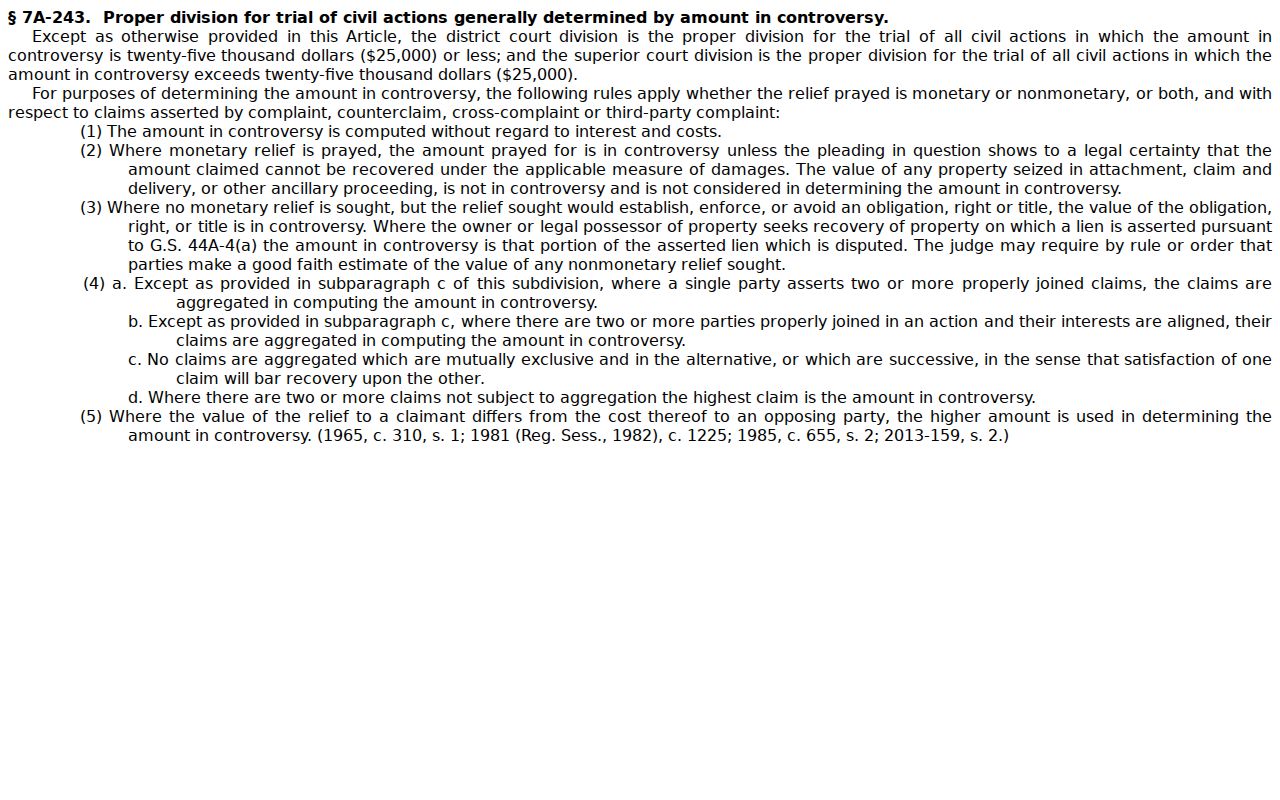
Amount and case type explain which calendar and assignment apply. They do not create separate county clerks or separate local docket systems.
The Judicial Branch's judicial district map publication places Tyrrell inside a district framework. That framework is shared with neighboring counties. Calendars and assignments can therefore be district products. A Tyrrell filing still sits with the Tyrrell Clerk.
The district map gives context for court settings. For the local case file, the record number and the Clerk still do the identifying.
Civil Case Types on the Docket
The civil docket covers more than one kind of lawsuit. Civil General and Civil Magistrate sit as distinct Portal labels. Estates and nonconfidential special proceedings carry their own procedures and filters while pointing back to the same Tyrrell Clerk and public-terminal framework. Classification helps explain an event sequence, a division, and a calendar. For the actual record-specific information, the public Case Summary is still the place to look.
- Civil General actions, including matters assigned to District or Superior Court.
- Civil Magistrate matters, including small claims within magistrate jurisdiction.
- Civil foreclosure and summary ejectment categories shown by the Portal.
- Estates, guardianship, and nonconfidential special proceedings handled through the Clerk's probate functions.
- Publicly available domestic and other civil categories, subject to statutory and court-ordered restrictions.
The Judicial Branch's civil lawsuits and small-claims information lays out the state court divisions and the common civil routes.
Note: A label can narrow a search, but the original filing and the Case Summary fix the exact civil case type. The state overview explains categories; the public Tyrrell docket supplies the events and the setting for one case.
Tyrrell Civil Docket Status Terms
A civil status is not the same thing as a final judgment. The Portal's documented vocabulary includes Pending, Unserved, Stayed, Reopened, Remanded, Transfer to Another County, and Transferred to Superior Court. It also lists several disposed outcomes. Post-disposition activity can follow even after that. Read each term beside the dated Case Events. Check the latest order and the current hearing information too. Status alone is not a complete legal conclusion.
- Unserved
- Service has not been completed or the docket still records an unserved event; it is not a disposition.
- Stayed
- The case is paused by a court action or procedure reflected in the case record.
- Reopened
- A case has later activity after a prior closure or disposition.
- Remanded
- The matter has been returned to a court after another proceeding or review.
- Transferred to Superior Court
- The Portal records movement to the Superior Court division.
NC Judgment Search works well for a judgment index. For anything deeper on a Tyrrell civil docket, go back to Smart Search. Need a paper order or a certified judgment? The Tyrrell Clerk handles those through its file and copy process.
Civil Docket Settings and Hearings
Two tools cover current civil settings. The Case Summary's Hearings category and Search Hearings in eCourts Portal each show what a docket has set. Search Hearings accepts a case number, a party or business name, an attorney name or bar number, a judicial officer, or a courtroom, and it always needs a date range. It returns current hearing locations and times. Not every result shows a judge, a setting subtype, or how to appear remotely, so read each entry with care.
The official Tyrrell civil calendar offers another public route. It is a county-filtered calendar, while the Portal does the field-level searching. One caution: a hearing can linger in the Case Events list after a continuance or reset. Compare the event history with the current result. When they conflict, ask the Clerk or courtroom staff. A calendar line also does not guarantee the case-call order or an exact time within a session.
Tyrrell Civil Calendar Search
Start with the case number when a civil hearing needs direct verification. Pull the Case Summary first. Open Search Hearings with a fitting date range. Then check the result against the Tyrrell civil calendar. If the matter is missing, stale, or restricted, call the courthouse main line at (252) 766-6510. The Clerk directory also answers at (252) 766-6543. The same courthouse sits at 403 Main St., Columbia. It offers the clerk counter, a public terminal, and the paper-file route.
The clerk terminal helps with public civil, estate, and special-proceeding cases. Some of these never display fully online. Missing document images, certified or official copies, and transcript or audio questions all start with the county clerk. Tyrrell County publishes no special online civil-copy form. There is no flat image price and no stated turnaround either. Ask the Clerk about the process for your case rather than assuming one.
Civil Docket Access Rules
Access starts with a statute. The clerk must keep records, files, dockets, and indexes by law, and G.S. 7A-109 opens those records to inspection during regular office hours unless another law says no. The eCourts Portal is a handy public display. It is not the official court record, though. For a public record that the web interface does not fully show, the Clerk's public terminal and paper file fill the gap.
Privacy and access: G.S. 132-1.10 requires certain personal identifiers to be omitted or redacted and allows a written request to the clerk for redaction without a fee. Sealed and confidential cases remain unavailable through the public Portal.
The personal-identifiers statute is the source for the redaction rule.
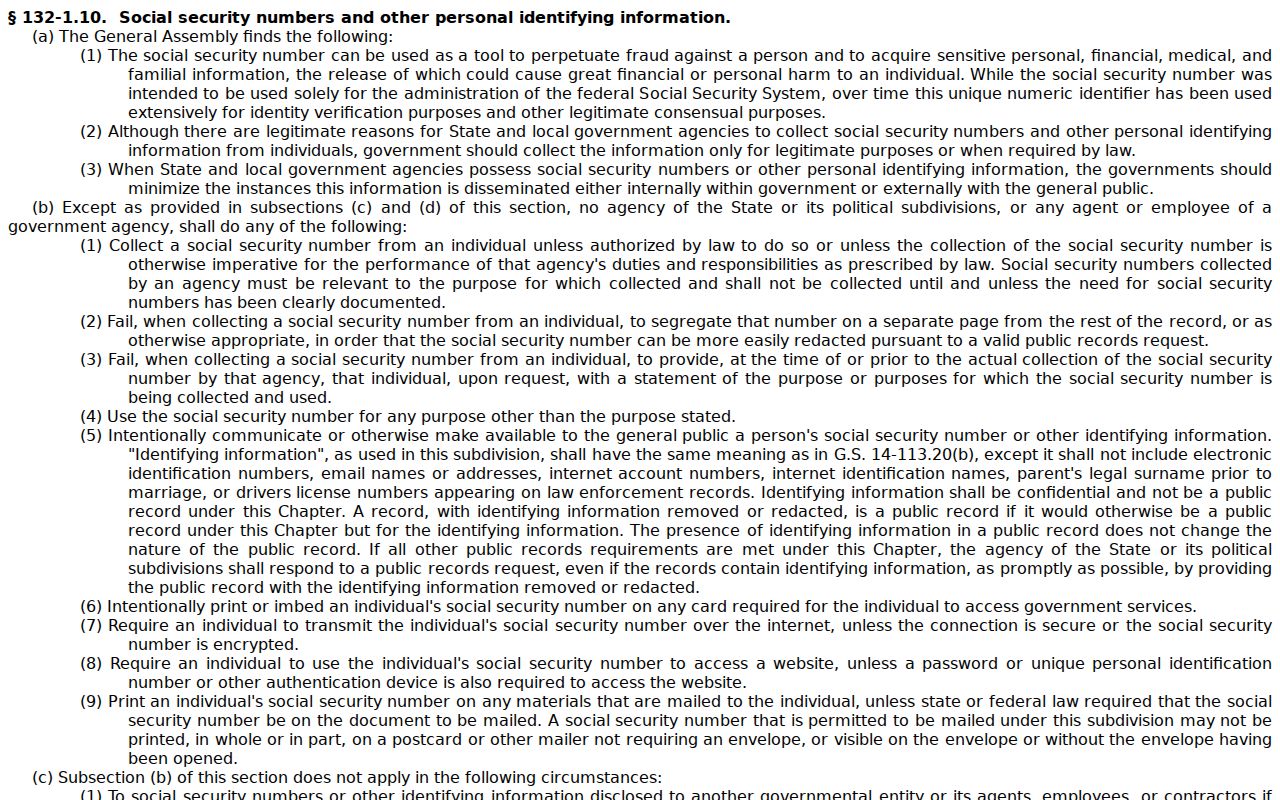
Redaction shields certain details. It does not turn a civil case into a sealed one.
A public-record request to the Judicial Branch has a limit. It reaches only the agency records that branch itself holds. It cannot replace asking the Tyrrell Clerk for the case file. Certified copies and fee questions belong with the Clerk. The controlling fee statute prices copy preparation, certificates, and exemplification as separate services.
Tyrrell Clerk Civil Docket Custody
One office holds the keys. The Tyrrell County Clerk of Superior Court keeps the court records for civil cases. Both Superior and District Court files sit there. The Clerk also handles probate work, covering estates, wills, guardianship, trusts, and special proceedings. That unified custody is why every errand ends at one counter. A civil docket search, a paper-file inspection, a terminal question, and a copy request all land in the same place, whatever the case type or trial division.
The official clerk record-keeping statute spells out the duty to maintain court records and dockets.
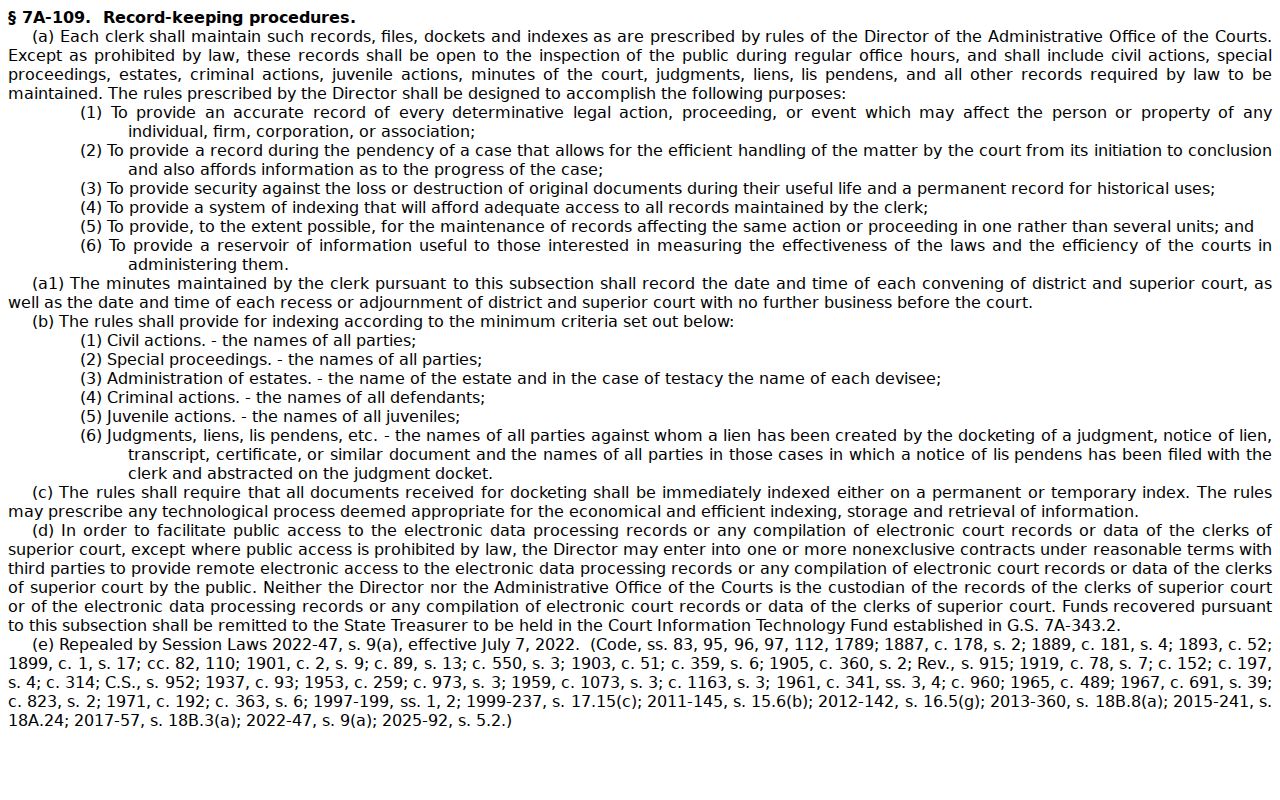
That statute makes the Clerk the official source. Use it whenever a Portal result needs checking against the case file.
For wider context, the Administrative Office of the Courts data and statistics hub publishes county reporting. It covers civil filings, pending cases, and dispositions. The site does not break out a Tyrrell County figure. So no local filing total appears here. Statewide numbers give the backdrop, not the docket itself.
Statewide reports can frame the bigger picture. For a particular case's events and setting, the Tyrrell civil docket is still the source that counts.